How to Download TikTok Videos Without Watermark via SaveTikTok
TikTok is a global hub for creative short films, but its built-in download feature often leaves annoying logos and IDs on the video. This can be a major hurdle if you want to reuse the content for professional editing or high-quality sharing on other social networks.
SaveTikTok is the ultimate solution, allowing you to save any TikTok video without watermark in HD quality. Our web-based tool is completely free, secure, and requires no software installation.
Why SaveTikTok is the Best Choice for You?
In a market full of tools like SnapTik or SSSTik, SaveTikTok stands out as a premium, high-speed, and specialized service:
- User-friendly interface, optimized for a seamless experience on any device.
- Ultra-fast download speeds with high-performance processing servers.
- Full cross-platform compatibility: works perfectly on Android, iOS, Windows, and macOS.
- Privacy-first approach: no registration required and no personal data collection.
Simple steps to save TikTok videos without watermark using SaveTikTok:
Step 1: Copy the TikTok Video URL
Step 2: Access SaveTikTok Downloader
Step 3: Paste and Analyze
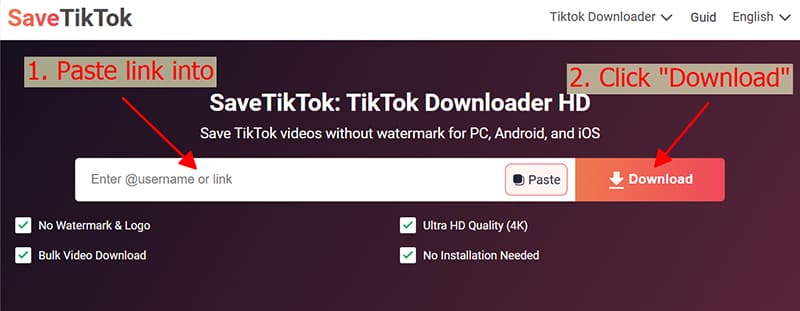
Step 4: Choose Quality and Save
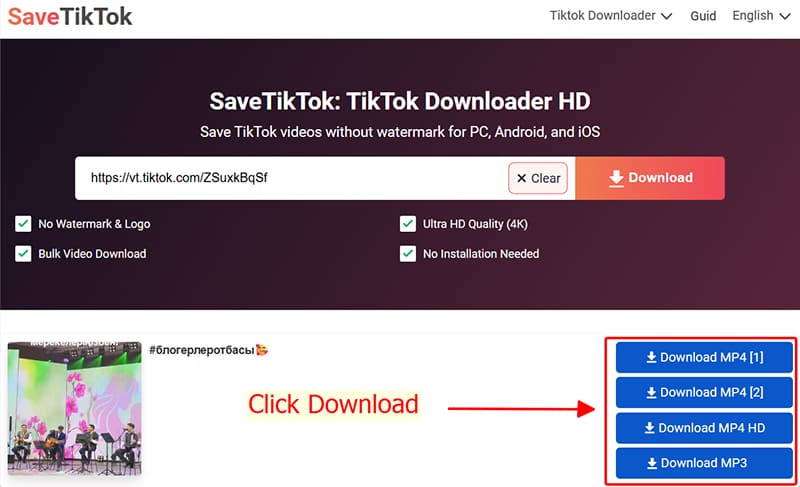
Pro-tips for a smooth experience with SaveTikTok
- ✔ Device Compatibility: Works perfectly on Android, iOS, Windows, and macOS.
💡 For Apple Users (iPhone/iPad)::
- 📂 Where are my videos? Saved files are usually in the Downloads folder of your browser. On mobile, you can find them in the 'Files' app or the 'Downloads' section of your browser history.
Copyright & Content Usage Disclaimer
SaveTikTok respects intellectual property. Downloaded videos are for personal, offline viewing only. If you wish to reuse or share content for commercial purposes, please obtain explicit permission from the original creator to avoid legal issues.
SaveTikTok – Your Ultimate TikTok Video Companion
Stop settling for low quality. With SaveTikTok, you can download high-definition, watermark-free videos in seconds. Whether on mobile or desktop, our secure and fast service is always 100% free. Experience the best way to save TikTok today!